
The CIDR Block Cheat Sheet Every VPC Needs
Why your EKS subnet runs out of IPs

You’re carving a new VPC. You pick a /24 for the app subnet because it “looks big enough.”
Six weeks later, EKS stops scheduling pods. Not because CPU ran out. Because the subnet ran out of IPs.
Now you’re stuck. You can’t resize a subnet in place. You’re either building a new one and migrating workloads, or you’re peering into a second range and praying it doesn’t overlap with the range another team already claimed.
That’s the CIDR tax. You pay it later, with interest, for a decision you made in thirty seconds at the start.
Here’s the thing. CIDR math isn’t hard. It’s just easy to get wrong when you’re guessing under pressure. So stop guessing.
This is the cheat sheet. The IP counts, the AWS gotcha that quietly shrinks every subnet, and the EKS math that drains a /24 faster than you’d believe. Screenshot it. You’ll reach for it every time you plan a network.
PS: Your shares are the main source of growth for this newsletter. My weekly goal is to get more than 100 shares for each article. It helps me maintain my laser-like focus on debugging production while keeping the article free.
Let’s dive in.
The 30-second mental model
A CIDR block is just an IP range written as network/prefix. The prefix is the number after the slash.
The prefix tells you how many bits are locked as the network. Everything left over is host space. That host space is your IP budget.
Here’s the only rule you need. Smaller prefix number means a bigger block.
A /16 is huge. A /28 is tiny. The number goes down, the range goes up.
It feels backwards the first time. It stops feeling backwards once you connect it to the math.
And the math is two shortcuts:
Each step of
8in the prefix multiplies the range by 256. So /24 has 256, /16 has 256 x 256 = 65,536.Each single
-1in the prefix doubles the range. /25 is 128, /26 is 64, /27 is 32, /28 is 16.
That’s it. Memorize the /24 = 256 anchor and you can derive every other block in your head.
But knowing the raw count is only half the picture. AWS doesn’t give you all of it.
The cheat sheet
Here’s the table you came for. Total IPs is the pure math. Usable is what you actually get on AWS, and you’ll see why those numbers don’t match in a second.
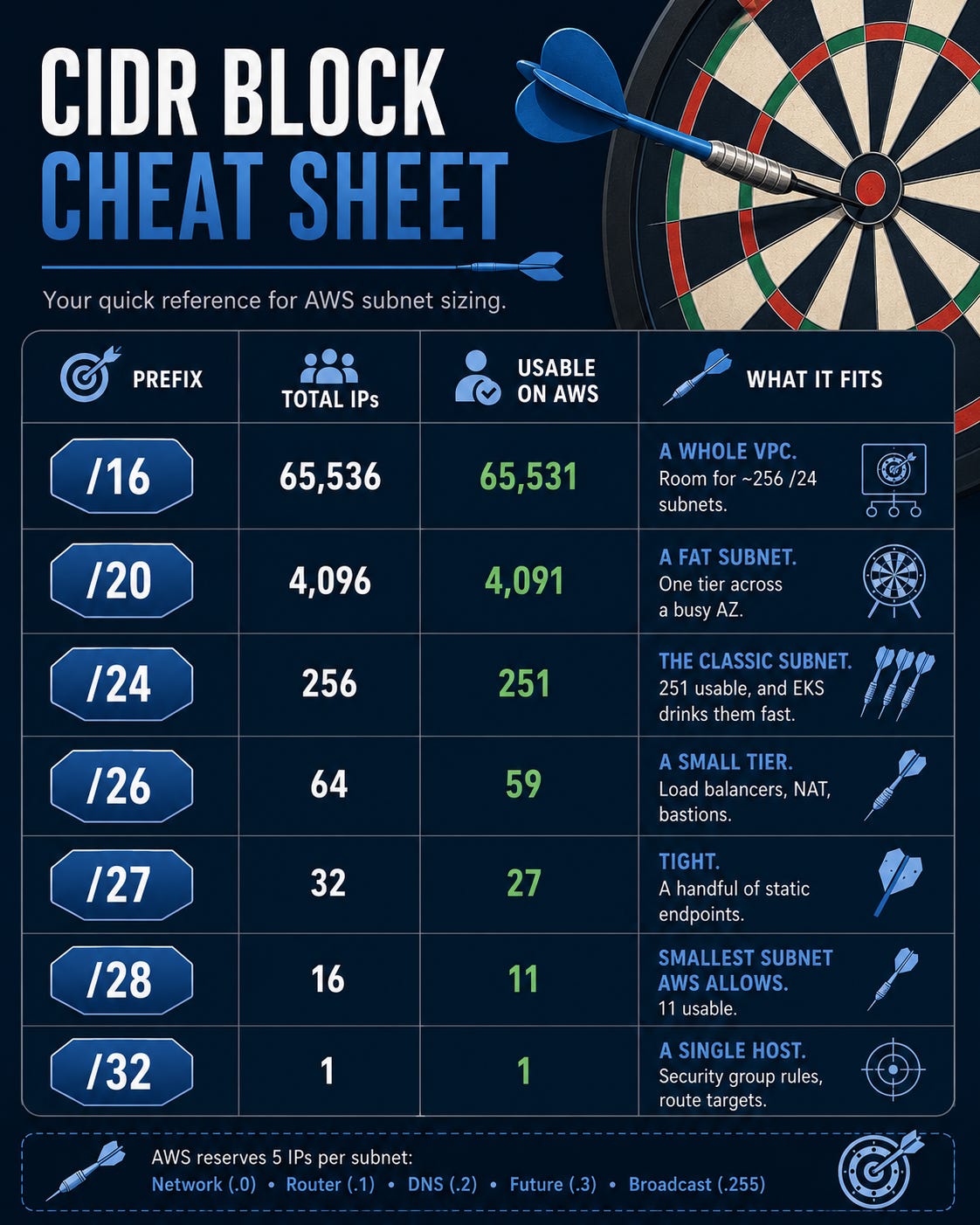
A few anchors worth burning into memory.
On AWS, a subnet can’t be bigger than /16 or smaller than /28. A /28 is the floor. A /32 isn’t a subnet at all. It’s one address, the thing you put in a security group rule or a route table target.
And notice the gap between “Total” and “Usable” in every single row. That gap is the part that bites people.
AWS reserves 5 IPs from every subnet
This is the gotcha that turns a /28 into 11 usable addresses instead of 16.
AWS takes 5 IPs out of every subnet you create. Always. The first four addresses and the last one:
The network address.
The VPC router.
The DNS server (the second address in the block).
One reserved for future use.
The broadcast address.
So your real budget is always total minus 5.
A /24 isn’t 256 usable. It’s 251. A /28 isn’t 16. It’s 11.
That sounds like a rounding error until you’re working with small blocks. Carve a /28 for a tier, assume 16 slots, and you’re already three short before you’ve launched a thing.
This matters most in one place. The place where every workload demands its own IP and the count moves fast.
That place is EKS.
Why EKS eats subnets alive
On most platforms, your pods live behind the node and share its IP. On EKS with the AWS VPC CNI, they don’t.
The VPC CNI gives every normal pod a real, routable VPC IP. From the same subnet your nodes use. (Pods on hostNetwork are the exception. They share the node’s IP.)
Read that again. Every pod is a first-class citizen on your network. Which is great for routing and security groups. It’s brutal for your IP budget.
Now two different limits start fighting you, and people constantly mix them up.
The first is per node. A node can only hold so many pods, and that ceiling has nothing to do with your subnet size. It’s set by how many network interfaces the instance can attach and how many IPs each one holds:
max-pods = (ENIs per node x (IPv4s per ENI - 1)) + 2Take an m5.large. It supports 3 ENIs with 10 IPs each:
(3 x (10 - 1)) + 2 = 29 podsSo an m5.large caps out around 29 pods. Not because of CPU. Not because of the subnet. Because it ran out of network interfaces. (Two of those 29 are hostNetwork slots, so it draws 27 real pod IPs from the subnet.)
The second limit is the subnet itself. Every pod IP comes out of the subnet’s usable pool. And it gets worse, because the CNI doesn’t claim one IP per running pod. It pre-warms a pool, attaching ENIs and grabbing their IPs ahead of demand.
So a single fully-warmed m5.large can hold close to 30 subnet IPs whether or not the pods exist yet. Plus the node’s own primary IP.
Do the math on a /24. It has 251 usable. Eight or nine busy nodes pre-warming IPs and you’ve drained it. Pods stick in Pending, and the event log says it plainly: the CNI couldn’t assign an IP.
That’s the failure people misdiagnose as a scheduler problem. It’s a subnet problem.
The escape hatch: prefix delegation
There’s a way out, and you should know it before you size anything.
Turn on prefix delegation and the VPC CNI stops handing out single IPs. Instead each ENI gets assigned /28 prefixes, blocks of 16 addresses at a time.
That changes the per-node math entirely. Now a single ENI backs far more pods, and instances can run 110, 250, or more pods each. The subnet drain pattern changes too, because IPs are claimed in /28 chunks rather than one at a time.
So if you’re running dense nodes, prefix delegation isn’t optional tuning. It’s the difference between a workable cluster and a re-IP project.
When should you skip the tiny subnet entirely? Any production EKS data-plane subnet. Don’t put nodes in a /26 and hope.
Give the data plane room. Which brings us to how you actually lay the whole thing out.
VPC planning rules of thumb
You’ve got the counts. Here’s how to spend them so you never hit the wall.
Size the VPC at /16. IPs inside a VPC are free. A cramped VPC is the one thing you can’t fix later without pain, so start oversized on purpose.
Carve generous subnets. A /20 or /24 per tier, per AZ. For EKS data-plane subnets, lean to /20 or larger so pod IPs have headroom.
Leave gaps between your subnets. Don’t allocate every block back to back. Future-you needs room to add a tier without re-planning the whole map.
Never overlap. If there’s any chance two VPCs will peer, or you’ll connect to a partner or on-prem range, their CIDRs cannot collide. Overlapping ranges can’t be peered. This is the mistake that forces a full re-IP, the most expensive networking mistake there is.
Write the plan down. A CIDR map in your repo beats five engineers each guessing what’s free.
The one-line version
Smaller prefix, bigger block. /24 is 256, halve it for each step down, multiply by 256 for each step of 8 up. Subtract 5 for AWS. On EKS, every pod is an IP, so size for pods, not nodes.
Keep the cheat sheet handy. The next VPC you plan, you’ll thank yourself for not guessing.
See you next week. Try not to break production before then.
Keep Decoding, Bhanu