
Your Readiness Probe Hammers Your App 864,000 Times a Day
Your default readiness probe is wrecking your DB

It’s 2:14 AM. You’re staring at a Grafana panel that does not make sense.
Your DB connection pool is saturated. CPU on the API tier is sitting at 40% baseline before a single user request lands. The error logs are a wall of /healthz 200 lines, drowning the one stack trace you actually need.
Traffic is flat. Nothing got deployed. Nothing changed.
Then you grep the access log for the last hour. Half the rows are coming from the same source: kube-probe/1.30.
Your readiness probe is hitting your app every 10 seconds. Per pod. You have 100 pods.
That’s 864,000 hits a day. On a service that gets maybe 200,000 real user requests.
You didn’t write a load test. Kubernetes did it for you. And you’ve been paying for it in CPU, in DB connections, in log volume, every minute since the day you shipped.
Let’s break it down.
The Problem: The Default Is a Hammer
Open any Helm chart, any tutorial, any cluster you inherited. The probe block looks like this:
readinessProbe:
  httpGet:
    path: /ready
    port: 8080
  periodSeconds: 10
periodSeconds: 10 is the Kubernetes default. It feels reasonable. Ten seconds is not aggressive, right?
Do the math.
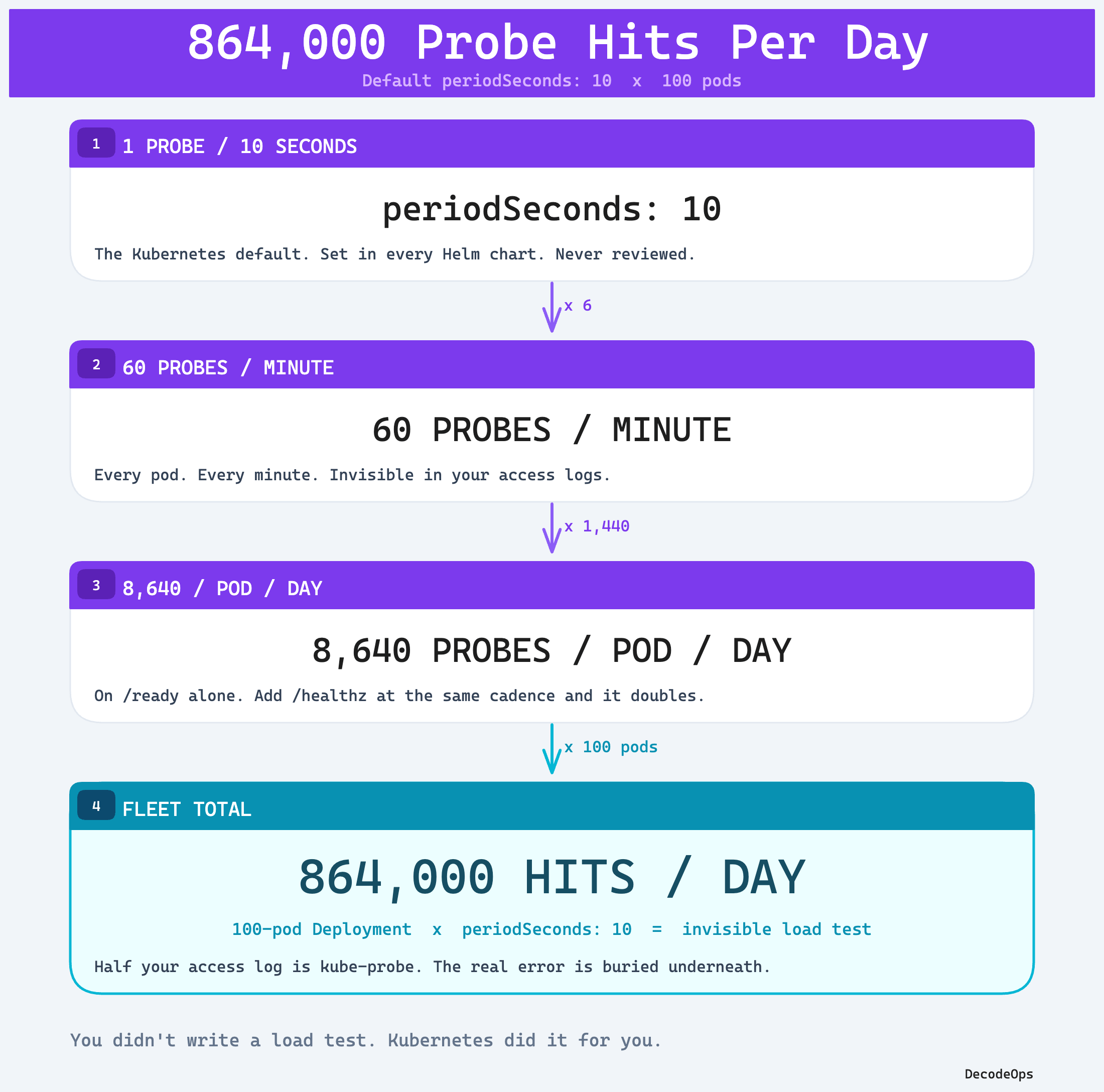
1 probe every 10s
= 6 probes per minute
= 360 probes per hour
= 8,640 probes per pod per day
One pod, no big deal. But you’re not running one pod.
100 pods on this Deployment. That’s 864,000 probe hits a day on /ready. Add a liveness probe on /healthz at the same cadence and you’ve doubled it. Add a startup probe and you’ve tripled the noise during rollouts. See this calculation:
Download/View above image with high quality
Now the real question. What does that probe actually do when it lands?
The Cascade: One Probe Is Never Just One Probe
Most readiness handlers are written by someone who wanted to be “thorough.” It’s the most common shape we see in code review:
func ready(w http.ResponseWriter, r *http.Request) {
    if err := db.Ping(); err != nil {        // 1 DB round-trip
        http.Error(w, "db down", 503); return
    }
    if err := redis.Ping().Err(); err != nil { // 1 Redis round-trip
        http.Error(w, "cache down", 503); return
    }
    if !kafka.IsConnected() {                  // 1 Kafka metadata call
        http.Error(w, "kafka down", 503); return
    }
    w.WriteHeader(200)
}
Looks safe. It is not. Watch the cascade.
1 probe hit
  -> 1 HTTP handler invocation
     -> 1 DB connection checkout + Ping
     -> 1 Redis round-trip
     -> 1 Kafka metadata fetch
     -> N log lines (request log + handler log + middleware log)
Now scale it.
100 pods x 8,640 probes/day
= 864,000 handler invocations
= 864,000 DB pings
= 864,000 Redis round-trips
= 864,000 Kafka metadata calls
= ~3-5 million log lines (depends on your middleware)
Per day. On a single Deployment. Before any user shows up.
That’s where your budget went.
Where the Budget Actually Goes
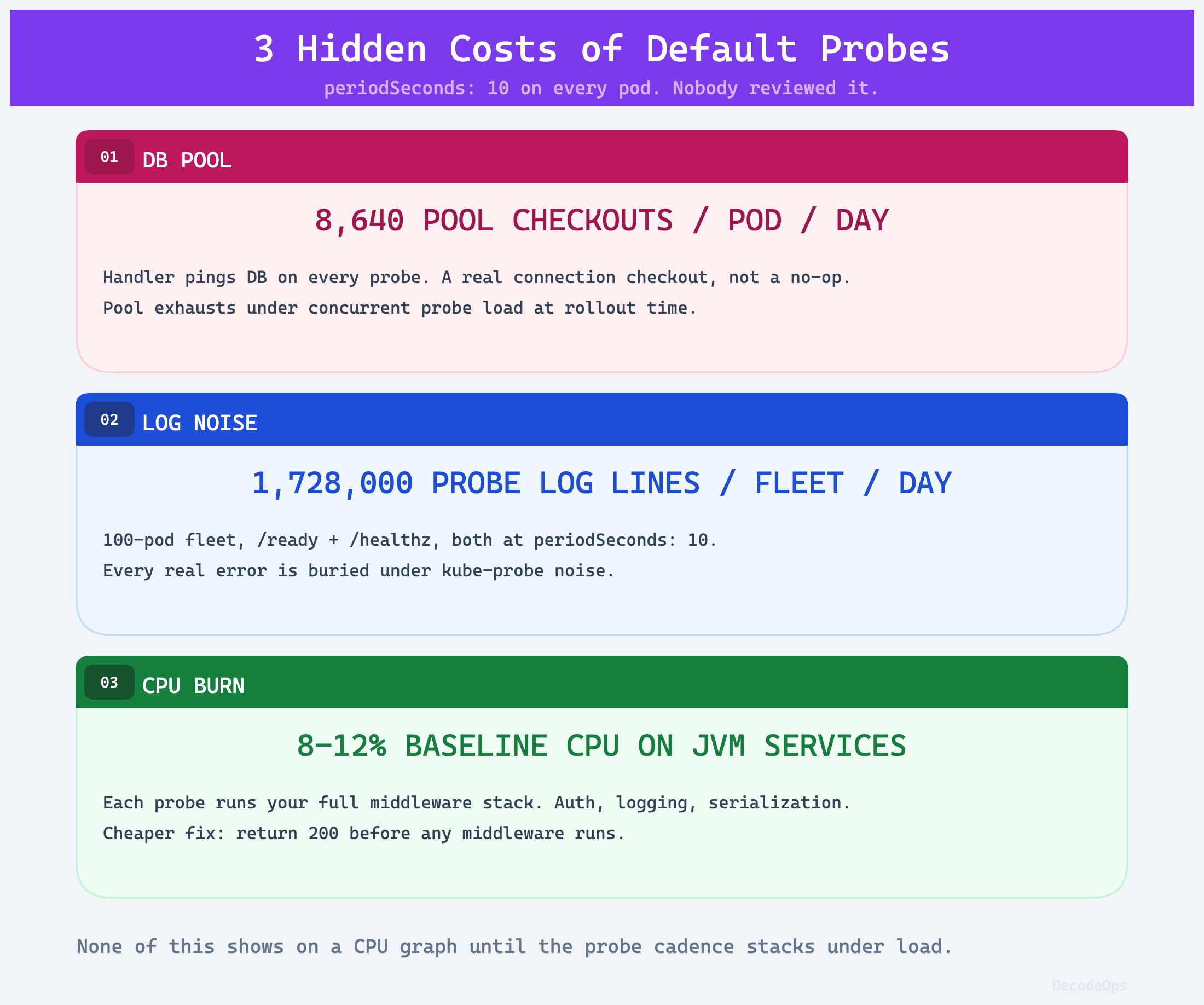
Three places. All of them invisible until you go looking.
1. The DB connection pool.
A bare SELECT 1 at this rate is mostly noise. The pain shows up the moment your /ready handler does real work. Auth middleware spinning up a context, a TLS handshake to a sidecar, a db.Ping() that checks out a pooled connection, a Redis round trip. Pool size 20, 100 pods checking out a connection every 10 seconds, that’s 10 checkouts per second against your DB on top of real traffic.
During a rolling deploy, when probes fire hot on every new pod, the pool can pin. Real user requests start queueing. Latency spikes. You blame the deploy. The deploy was fine. Your probe handler was the load test.
The smaller the pool and the heavier the probe handler, the faster you find this. Cheap probe + huge pool = invisible. Heavy probe + tight pool = a 2 AM page.
2. The log pipeline.
Your access log middleware doesn’t know /healthz is special. Every probe is a log line. 8,640 lines per pod per day on /ready alone. Add /healthz at the same cadence and that doubles. 100 pods on this Deployment and you’re writing 1.7 million probe log lines a day before a single user request shows up.
Your log bill is half probe traffic. Worse, when production breaks, you kubectl logs and the actual stack trace is buried under 200 lines of GET /ready 200 1ms. You can’t see the signal because the probe is the noise.
3. CPU baseline.
Each probe wakes up the runtime, allocates a request context, runs your middleware chain, maybe hits downstream systems, formats a response. On a Go service returning a static 200 it’s microseconds and you’ll never see it on a graph. On a JVM service warming up under GC pressure, with auth middleware and a synchronous dep check in the probe path, it’s not.
We’ve seen apps where readiness probes alone account for 8-12% of baseline CPU. The pattern is consistent: the cost is proportional to what your handler actually does, multiplied by 8,640 per pod per day. A trivial probe is free. A “quick” dep check at that rate is not.
Save this infographic and show this to your team.
Download/View above image with high quality
If you’re finding this useful, subscribe to DecodeOps. You’ll also get my free Kubernetes Troubleshooting Field Guide, 200+ pages, 30 real production scenarios, as your welcome gift.
The Fix: Stop Treating Probes Like Integration Tests
Here is the rule. A readiness probe answers one question: is this pod able to serve traffic right now?
If the pod genuinely cannot serve without a critical dependency, readiness should reflect that. A CRUD API with no DB has nothing to serve. Don’t pretend otherwise.
The defensible rule is sharper: never run an expensive synchronous check on every probe. Cache dependency state in memory, refresh it on a background tick, have the probe handler read the cached value. Same correctness, a fraction of the load.
A probe handler is not a smoke test. It is not your monitoring system. It is a 200/503 decision read from cached state.
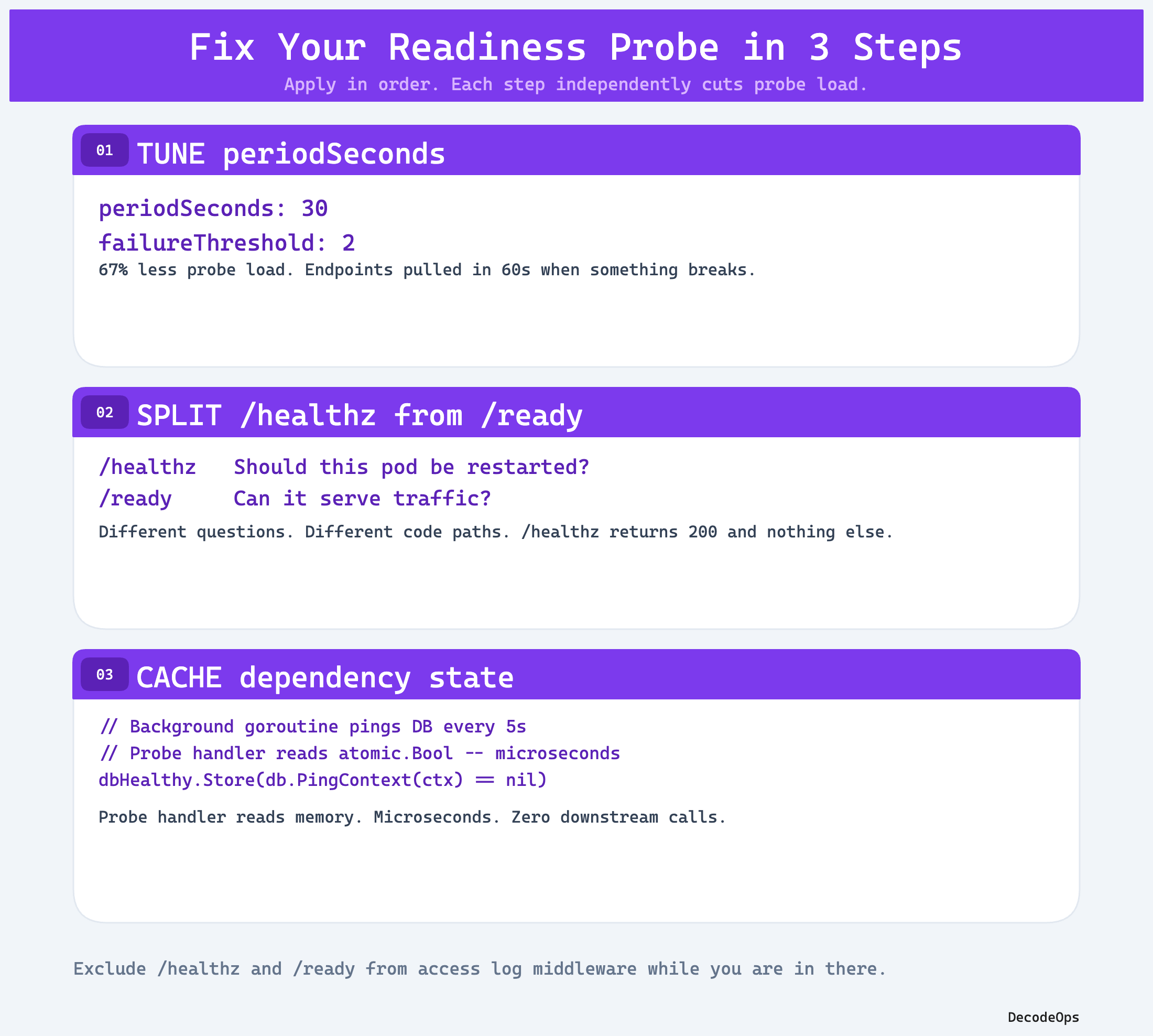
Three changes. Apply them in order.
Fix 1: Tune periodSeconds.
The default of 10 seconds is wrong for almost every workload. Kubernetes uses readiness to decide whether to send traffic. If your pod is healthy, you don’t need to confirm that 8,640 times a day.
readinessProbe:
  httpGet:
    path: /ready
    port: 8080
  periodSeconds: 30      # was 10
  timeoutSeconds: 2
  failureThreshold: 2    # 60s to evict from endpoints
Going from 10s to 30s cuts probe traffic by 67%. From 864,000 hits a day to 288,000.
This is a tradeoff, not a free lunch. Today, with periodSeconds: 10 and failureThreshold: 3, a broken pod gets pulled from endpoints in roughly 30 seconds. With 30s and failureThreshold: 2, that becomes 60 seconds. You’re trading 30 seconds of detection latency for 67% less probe load.
For most stateless web services behind a load balancer that already retries on 5xx, that tradeoff is obvious. For latency-critical paths where 30 extra seconds of bad pod = real revenue loss, keep the period tight and fix the handler instead. Pick deliberately.
Fix 2: Separate /healthz from /ready. They are not the same handler.
Liveness asks: should Kubernetes restart this container? Readiness asks: should Kubernetes send traffic here? Different questions, different answers, different code paths.
// /healthz: process is alive. That's it.
// No DB. No Redis. No downstream calls.
func healthz(w http.ResponseWriter, r *http.Request) {
    w.WriteHeader(200)
}

// /ready: this pod can serve a request right now.
// Cheap, in-process checks only.
func ready(w http.ResponseWriter, r *http.Request) {
    if !server.Started() || server.Draining() {
        http.Error(w, "not ready", 503); return
    }
    w.WriteHeader(200)
}
Notice what’s missing. No db.Ping(). No Redis. No Kafka.
Fix 3: Push dependency state into a background check, not the probe handler.
If you genuinely need the pod to drop out of the load balancer when the DB dies, run that check in a goroutine on a 5-second tick. Cache the result. Have the readiness handler read the cached boolean.
var dbHealthy atomic.Bool

func init() {
    // Run an immediate check so /ready reflects reality before the first tick.
    checkDB := func() {
        ctx, cancel := context.WithTimeout(context.Background(), 1*time.Second)
        defer cancel()
        dbHealthy.Store(db.PingContext(ctx) == nil)
    }
    checkDB()

    go func() {
        t := time.NewTicker(5 * time.Second)
        for range t.C {
            checkDB()
        }
    }()
}

func ready(w http.ResponseWriter, r *http.Request) {
    if !dbHealthy.Load() {
        http.Error(w, "db unreachable", 503); return
    }
    w.WriteHeader(200)
}
One DB ping every 5 seconds, regardless of how often Kubernetes probes. The probe handler is now an in-memory atomic read. Microseconds. Zero downstream calls.
And exclude /healthz and /ready from your access log middleware while you’re in there.
Save this for future reference:
Download/View above image with high quality
When to Lower vs Raise periodSeconds
Most teams should raise it. A few should lower it. Know which one you are.
Raise it (most cases, default to 30s):
Stateless API tier with healthy rolling deploys
Anything where a 30 to 60 second window to evict a bad pod is acceptable
Apps where the probe handler touches anything beyond an in-memory check
High pod count fleets where probe traffic is a measurable share of total load
Lower it to 5 seconds (rare, deliberate):
Critical low-latency path where eviction needs to happen in seconds, not a minute
Stateful workloads during a known-flaky window (failover, leader election)
The probe handler is genuinely a no-op atomic read with zero downstream cost
If you can’t justify the lower number with a specific failure mode the team actually hit in production, you don’t need it. The default exists because it’s safe in a demo cluster. You’re not running a demo cluster.
The Takeaway
Your readiness probe is a cron job you didn’t schedule. It runs against your app forever. The cost compounds with every pod you add.
Audit the probes on your three highest-traffic Deployments tomorrow morning. Look at three things:
What is
periodSeconds? If it’s the default of 10, ask why.What does the probe handler do? If it touches your DB, fix it.
Are probe requests in your access logs? If yes, exclude them.
Three changes. No new tools. No new dashboards. You’ll watch your DB connection baseline drop, your log volume drop, and your CPU baseline drop, all before lunch.
Share this with your 3 teammates and receive “Production Outage Checklist.”
What’s the worst probe handler you’ve inherited? Share your war story in the comments.
See you on Sat. Try not to break production before then.
Keep decoding,
Bhanu from DecodeOps